Brian's Virtually Useful Blog

User’s AD account being locked out by vCenter 5.0 server, how I found our culprit

July 30, 2012 · 1 comment

My vCenter is running Windows 2008R2.  I tried Running the Microsoft sysinternals tools to find out which host is locking out this user and it kept pointing me to vCenter.  Of course to me it didn’t make any sense why vCenter would be locking this user out every 60 minutes.  I also checked the standard stuff, no services running as the user, nothing under the “Credential Manager” on vCenter.  There are also several VMware KB’s for dealing with the issue, they want you to use TCPVIEW, and some other tools, but none of them helped me on this one.

I’ll start my troubleshooting steps below after the normal sysInternals AD “find out which machine is locking the user out” steps.

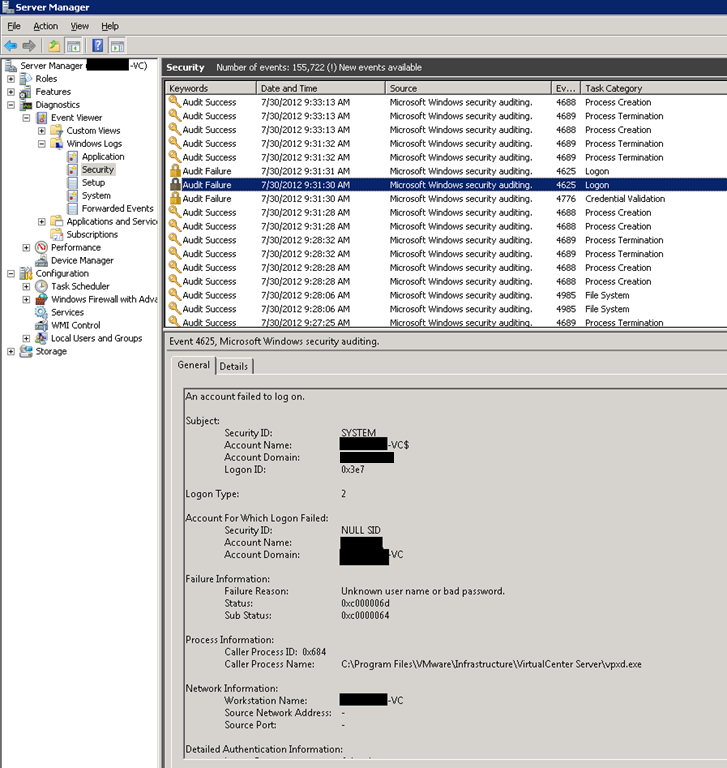
1) I logged into vCenter and opened “Server_Manager/Diagnostics/Event_Viewer/Windows Logs/Security”

I saw the following 3 Audit Failures happening ever 60:16 seconds (not sure if that interval is important to the issue, but it gave me an ability to predict the next occurrence).  Since the last event was at 9:31:30am, I can predict the next occurrence at 10:31:46am.   You can see the “Account for Which Logon Failed:” “Account Name:” is the usersloginname, this is key information we’ll use later.
image

2) Logging into vCenter I see this under “Tasks & Events”, the timestamp is an exact match to the Event Log Event above.  I see nothing that correlates to this timestamp under vCenter Tasks, which makes me think this is being initiated from an external (to vCenter Service) source.

image

3) Before I realized this was happening every 60:16 I grabbed a large packet capture on my vCenter Server.  Now that I could predict the exact second this would happen again, I decided to capture a smaller time window with a script.

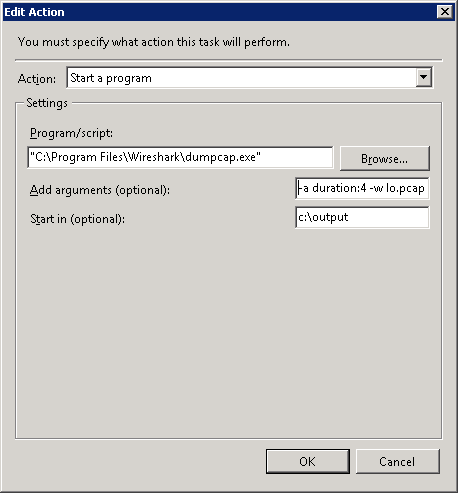
I setup a single scheduled wireshark dumpcap by utilizing Windows Task Scheduler.
image

The dumpcap –a parameter specifies a 4 second duration of packet capture, the –w specifies what to name the output file, lo.pcap in this example.  I dumped the files into a directory called c:\output .  I didn’t use the default location because when I ran the script manually (from the command line to test) I received access denied, and since I’m too lazy to troubleshoot it, but I’m pretty security minded, I setup a temp directory called output that I gave everyone full control to.  I setup the schedule to start the capture 2 seconds before the planned event and it did successfully gather the data I needed.
Continue reading →

Can’t take ownership of a file on Windows 2008 Server

July 27, 2012 · 2 comments

Trying to delete a folder (with files in it) on my server today, for whatever reason I could not enter, delete, or take ownership of this folder.  I tried the UI, as well as the takeown command, both returned an access denied trying to take ownership.  Because I am a full administrator, my suspicion is that there is an open file.  Because this is a file server with hundreds of open files and folders, I could not easily identify the connection to close.  I rebooted the server, and without issuing any more commands my access to the files/folders had returned.  GO MICROSOFT!..

My Troubleshooting a HP Flex 10 FCoE connection to a Cisco Fiber Channel MDS Switch

July 20, 2012 · 2 comments

First, some good links for documents about this:

Cisco, VMware, HP

The Problem:

Upon building a new HP chassis full of blades, hoping to connect my new blades to storage, I was build zoning rules connecting them to our EMC VNX, Inside of Cisco Fabric Manager I did not see the HP blades listed so that I could build zoning rules.  The other suspicious item was that inside of HP Virtual Connect Manager, inside of the “SAN Fabrics” tab, I was giving a warning for a status. 

The Setup:

I had setup this up in a fully meshed fiber with NPIV enabled everywhere.  1 HP Chassis, two Flex 10 modules, two Cisco MDS switches, and one EMC VNX.  My flex 10 modules were each connected directly to both of the Cisco MDS Switches.   Each of the Cisco MDS’s were connected directly to each of the SP’s on the EMC VNX (fully meshed). 

The Solution:

I worked on this for some time, then after changing the connections on the Flex 10’s to both go directly to the SAME Cisco MDS switch (removing the mesh from the Compute side), the HP Virtual Connect finally showed happy, and the Cisco MDS began to see all the HP Blades and I was able to connect storage.  So what did I do wrong originally?  I am sure there is a great reason, but what part of Fiber Channel for Dummies did I miss?

EMC VNX Storage Pool Design & Configuration

July 19, 2012 · 5 comments

The EMC Whitepaper on VNX Best Practices h8268_VNX_Block_best_practices.pdf is the way to go, I used version 31.5 as it is the most current one available.

Storage Pools vs Raid Groups vs MetaLuns

From an design perspective, MetaLuns were basically replaced by Storage Pools, Storage pools allow for the large stripping across many drives that MetaLuns offers, but with a lot less complexity. MetaLuns are now generally used to combined/expand a traditional LUN.  Raid Groups have a maximum size of 16 disks, so for larger strips this isn’t a viable option.  For situations where guaranteed performance isn’t critical, go with Storage Pools, use Raid Groups if you need deterministic (guaranteed) performance.  The reason behind this is that you are probably going to create multiple LUNs out of your storage pool, so this could lead to one busy LUN affecting the others.

Raid Level Selection

Assuming your going with a Storage Pool, your options are Raid 5, 6, or 1/0.  If you are using large drives (over 1TB) then Raid 5 is not a good choices because of long rebuild times, Raid 6 is almost certainly the way to go.  Always use suggested drive numbers in the pools, Raid 5 is 5 disks, or a number that evenly divides by 5, Raid 6 & Raid 1/0 is 8 disks or a number that evenly divides by 8.  If you use less than the recommended you will be wasting space.

How Big of a Storage Pool do I start with?

Create a homogeneous storage pool with the largest number of practical drives.  Pools are designed for ease-of-use.  The pool dialog algorithmically implements many Best Practices.  It is better to start with a large pool, as you add disks to the pool, it does not (currently) restripe the disks, and therefore if you only added 5 disks to an existing 50 disk pool, the new LUNS would have much lower performance.   The smallest practical pool is 20 drives (four R5 raid groups).  It is recommended practice to segregate the storage system’s pool-based LUNs into two or more pools when availability or performance may benefit from separation. 

I am only covering a small portion of what you need to know.

When dealing with storage, there are thousands of options, homogeneous drives vs. heterogeneous, Thick vs. Thin Provisioning, Fast VP Pools, Drive Speeds, Fast Cache and Flash Drives, Storage Tiering, the whitepaper above does a great of of detailing all of that, I won’t try to improve on what EMC has said.

Changing passwords on a TFS (Microsoft Team foundation server 2008) Service Account

June 25, 2012

DISCLAIMER: I am not an TFS expert, at all. 

Besides the normal of modifying the password in service manger, I found a few other things.

Hopefully it’s a VM so you can take a snapshot before you do anything.

Much of this data I got from “How to change the Service Account or Password for Team Foundation Server”

1) SQL reporting services will need to get updated, I believe you can do it through the TFSAdminUtil with the /ra option, or you can run through the Reporting Services Configuration again.

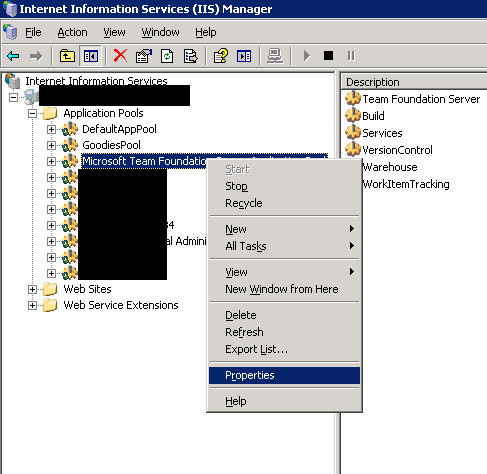
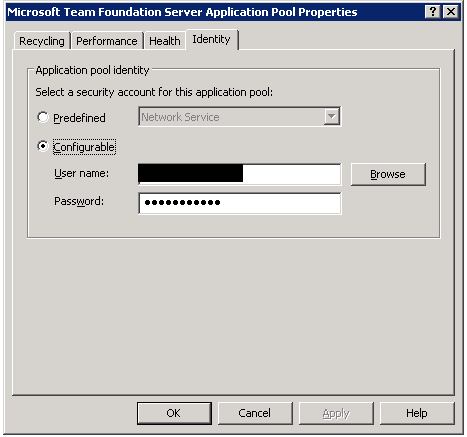
2) You may need to modify service account passwords on IIS Application Pools, such as the “Microsoft Team Foundation Server Application Pool” under Identity update the password, I had to update 3 of my pools.

image

image

Good Luck!

VCDX #91

May 24, 2012
I learned yesterday am that my defense was successful. What a long journey, and I passed everything the first time, I can only imagine what others have gone through. I am thrilled to join such an elite community of VMware professionals.

VCDX thoughts

May 22, 2012
I am right in the middle of my wait for VCDX results, so I thought I'd share some thoughts before I know if I pass or not
1) The questions were fair, that doesn't mean I knew the answers, just that I probably should/could have.
2) It's alot more fair than any electronic test.
3) Stay calm, don't let them run you down to crazy town, actually that's not true, they got me off balance, I ran down to crazy town all by myself.
4) Be confident, show your thought process, but admit what you don't know, you can't BS these guys.
5) If I don't pass I look forward to doing a better job next time.
6) The wait is just awful, 10 business days will give you ulcers if you let it.

EMC world 2012 day 1 thoughts

May 22, 2012
Attended some great sessions on vSphere performance, power path optimizations, vcops vnx plugin -integration , view IOPS performance, vf-cache (taking Storage cache into the server)
Good stuff, excited to be at day 2!

Lab Manager ESX 4.1 Host can’t join back into Lab Manager, reporting error “Host is entering maintenance mode”

May 4, 2012 · 5 comments

Recently upon pushing patches to our ESX 4.1 and ESXi 4.1 hosts, I was unable to re-enable 2 of our 23 blades.  We had one of each flavor, ESX and ESXi.  After much frustration I found our KB 1026364, which says:

===================================================

To resolve this issue, restart the Lab Manager VSLA backend service.

To restart the VSLA backend service on Lab Manager:

  1. Log in to the Lab Manager server.
  2. Go to Start > Run and type service.msc.
  3. Right click the VMware vCenter Lab Manager Monitor service.
  4. Click Restart.

When you restart the Lab Manager VSLA service , the DVS becomes unavailable. When the service starts again, Lab Manager gets the latest status from the vCenter Server.

After the Lab Manager VSLA service starts again, you can start repairing the ESX hosts or try re-enable host-spanning within Lab Manager.

===================================================

After restarting this service, I was able to repair our Hosts without issue.