Brian's Virtually Useful Blog

Today is IPv6 day, what a joke.

June 8, 2011 · 1 comment

I don’t usually do editorials, but today I feel like I have to.

Being an IT person who’s spent all day, every day of the last 14 years doing IT work, I think it’s safe to say that worldwide fully routable IPv6 is not even close to a reality.  I remember about 10 years ago I was told that the ‘whole internet’ was going to shut down for a few days to swap over.  That simply isn’t going to happen.  Newer Desktop OS’s support IPv6, on the other end, web servers like google.com support IPv6, the problem is that most ISP’s don’t support IPv6, most routers, most firewalls, IPS/IDS’s, etc… do not support it.  These take months-years to fully configure, assuming you can convince the CIO to eat the cost and replace your hardware, just so other new companies who want to join the internet can have a new routable space (good luck with that).  The other problem is that applications are very tied to IPv4, converting them would be a daunting task at best. 

I also feel another big issue is that we really REALLY don’t need IPv6, there are FAR too many large companies that put public addresses on EVERY single desktop in the corporation, luckily most of them are not truly bidirectional routable (thank god for some security sense).  In today’s economy, the smartest thing we can do is to stay on IPv4 and take back all the Class A & B networks that are not assigned to ISP’s, give those companies a class C or two, make them only use Public IP’s on their externally routed machines. 

The other option is to truly move to IPv6, I have no doubt we can ‘use’ IPv6, the problem is turning off the IPv4.  The only way to make this happen is to mandate it, just like the HDTV switchover, it NEVER would have happened if the government had not forced it to.  If you put an end date, CIO’s will be forced to allocate the time & money to reconfigure their networks and rewrite their applications.

I made a bet with a co-worker back in 2007, the bet was a steak dinner for me if the whole internet had not moved over to IPv6 by 2011, I’m going to enjoy that steak, anybody else want to make me a bet on 2015?
Copy File problem in windows 7 x64

May 28, 2011 · 2 comments
I've been having problems copying from a specific desktop to my 2008R2 server for a long time now. The problem is most notable when I copy pictures to my server. To solve the problem I disabled:

IPv4 Checksum Offload
Large Send Offload (IPv4)
Large Send Offload v2 (IPv6)
TCP Checksum Offload (IPv4)
TCP Checksum Offload (IPv6)
UDP Checksum Offload (IPv4)
UDP Checksum Offload (IPv6)

Now it is working well.

My First NetApp

May 25, 2011 · 2 comments

We just purchased a NetApp FAS3240 for our new vCloud, This made me really miss my comfort zone with EMC products.  But here are the initial setup challenges I faced and how I overcame them

1) Basic wiring, who puts the Shelves on the bottom really?.  So the wiring diagram is giving me headaches because there is no way I’m racking top-down.

2) Basic wiring continued.. because this NetApp was purchased with HA, and there are ports labeled c0a & c0b that are described as “Controller to controller HA cable” I incorrectly assumed I needed to use them.  After waiting overnight to get access to the NetApp.com website(Really? it’s 2011), I was able to download the manual and find that “they use an internal InfiniBand connector between the two controller modules, so no interconnect adapters or cabling is required.”

3) Basic console setup, This requires a serial cable (you know that thing they stopped putting on laptops 6 years ago).  You’ll need to setup each controller module separately, I only configured the maintenance port, which is e0m (wouldn’t it be nice if that was on the sticker with the other e0 labels, or at least in the big blue instructions that comes with it).

4) Web Setup, https://ipaddress/api for setup then https://ipaddress/na_admin/ for management.  I could only partially use the UI, it is java based, but it doesn’t work unless you modify your java setup.  Start/Control Panel/Advanced Tab/Security-General/uncheck “Use TLS 1.0” then close/reopen your browser. 

5) Once I had the web UI working, it was reporting that I had a Shelf Failure, this turned out to be a co-worker didn’t fully seat a power cable, but that wasn’t clearly bubbled up as a power issue, more of a vague shelf error. 

6) HA was not working, instead of there being an actual problem, I went into Cluster/Manage/ “Enable Takeover” and instantly my unit went from Red to Green and everybody was happy, I could now ping both Management IP’s and HA was online.

7) I am still having issues getting email alerts and NTP working consistently, and I haven’t setup any LUNS or exports yet.  That’s an adventure for next week.

Lab Manger Login Error: The username -whatever- already exists in vCenter Lab Manager. Please ask your Administrator to delete the previous user account.

May 23, 2011

A user called me with this error, I had never heard of it before, but here is what happened. The user left the company, I disabled his account.  He was rehired by the company, so I re-enabled his Lab Manager account.  However, his AD account had been deleted (by company policy) and he had been generated a new AD account with the same login name.  LBM was smart enough to know that this was not the same account and gave me a valuable error message.  I deleted his LBM account, recreated him and was ready to roll.

Lab Manager HA Settings

May 14, 2011 · 1 comment

For some reason Colorado Springs has frequent late night power outages, or at least our building does.  Our most common downtime event with Lab Manager (besides maintenance) is complete power outages, yes we have UPS’s, but they don’t last forever and the lab doesn’t get generators.  I’ve been playing with the HA settings for a long time, this is what I’m going to try going forward.  Assuming your vCenter and LBM box are hosted in the same cluster as your guests, powering on the whole environment can take hours and be a huge pain.  Here is my proposed solution.

In the “Virtual Machine Options” page of the HA configuration

vCenter Server = VM Restart Priority High

LBM Server = VM Restart Priority Medium

Cluster Default settings = VM restart Priority Low

Hopefully this will allow my vCenter a chance to get up and running before all the guests boot and cripple my ESX hosts for 2+ hours.

Best iPad Apps

April 30, 2011
The apps you want depend on what you want to do. I take alot of notes and like onenote alot. I have MobilNoter because it syncs my desktop onenote to the cloud, then back/forth from my iPad. I don't use any of the office apps, I use GoodReader to allow me to open about anything. Dropbox and File Browser allow me to get files on/off the iPad. You always want the "HD" version of an app if you can find it, it will be worth it for the enhanced resolution.

Cool Apps:
Flipboard, Netflix, Directtv, Pandora, Fandango, TheOnion, Google Earth, NASA

TV:
ABC, Discovery, PBS

News:
The Weather Channel Max+, CNN, USA Today, NY Times, Drudge Report, Engadget, Macworld, Pulse News, Local News Apps, newspapers & TV stations

Search:
Google, Bing (no i'm not kidding), Yelp, Zillow

Travel:
TripAdvisor

Social:
Facebook, Twitter, Beluga, Skype

Games:
Angry Birds (all varients),Stick Golf,Risk

Sports:
Yahoo Sportacular, ESPN ScoreCenterXL

Tools:
Alarm Clock, Ping, Speed Test, RDP, Penultimate, WebEx, VMware VIEW client, VMware vSphere Client, iBooks, Kindle

Can’t sudo on a CentOS box

March 30, 2011 · 1 comment

UserXYZ is not in the sudoers file. This incident will be reported.

Just run this as root

echo 'userXYZ ALL=(ALL) ALL' >> /etc/sudoers

vSphere iPad app is pretty cool

March 18, 2011

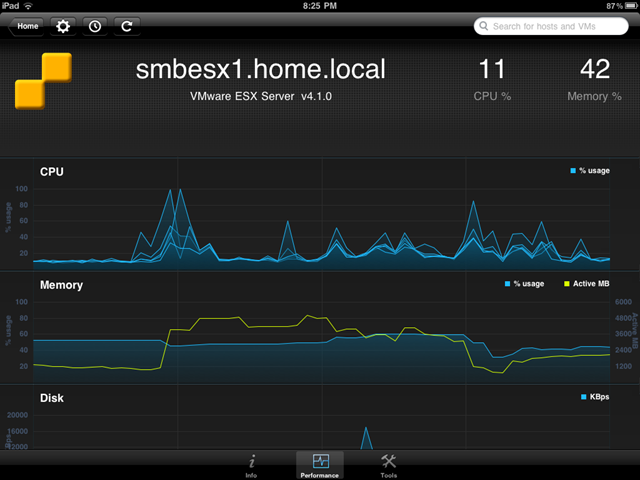
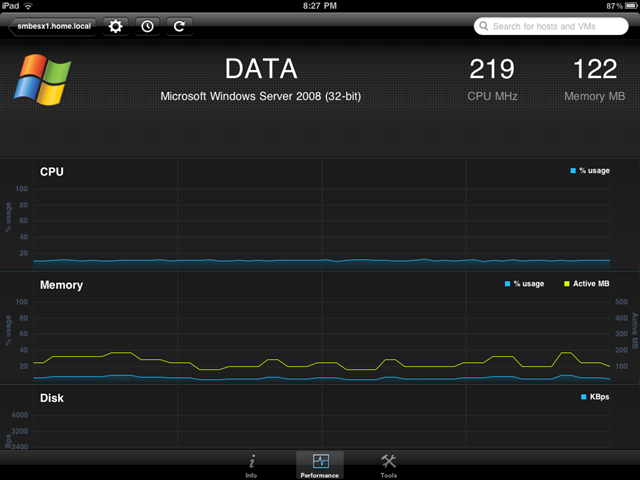
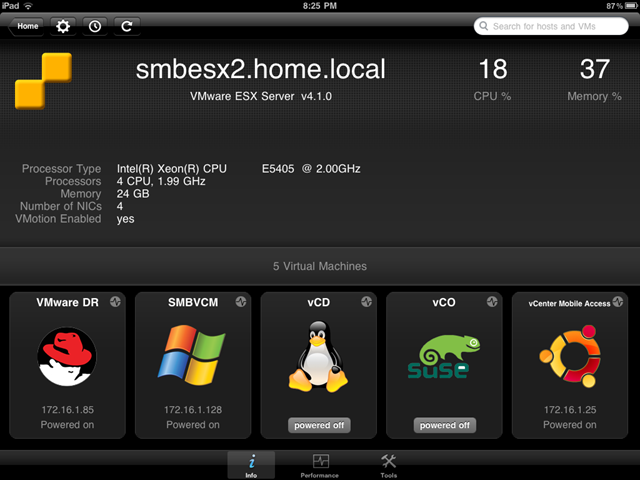
So far I really like it, gives great info at a glance, lets you do cool things like put hosts into Maint mode and gives alot of performance info.

4

2

1