Brian's Virtually Useful Blog

vCloud User and Resource Organization

July 25, 2011

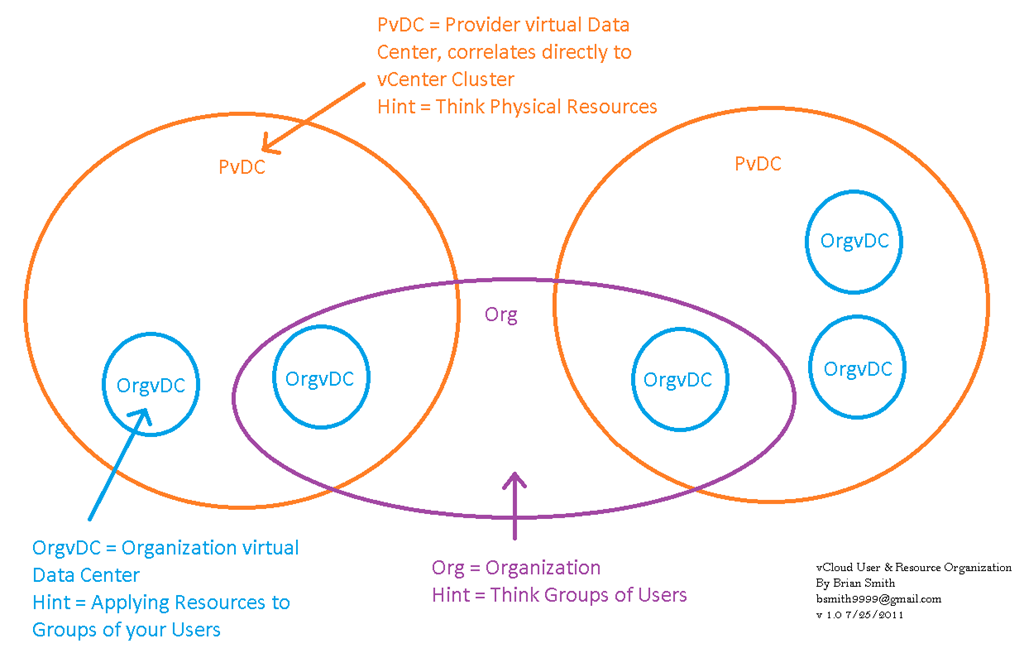
I’ve been struggling with understanding how PvDC’s(Provider vDC), Org vDC’s(Organization vDC), Organizations all relate inside of vCD.  I drew up a graphic that helps me understand, hope it helps you as well.

vCloud

Click the picture for a full size graphic.  Thanks to our resident vCloud expert @tomralph for helping me understand

vCD (vCloud Director) Provider vDC Setup problem

July 19, 2011

You click “Add Provider vDC”, then you select your vCenter server, but the clusters you want to add do not show up in the right hand panes under “resource pool” and “VC Path”.  The reason is that you don’t have DRS setup on the clusters, Cloud Director will need that to create the resource pools while setting up the Provider vDC.

R.I.P. my first iPad2 4/4/11 to 7/8/11

July 11, 2011

broken_iPad

Oh how I barely knew you, only a little over 3 months old before you were dropped to you death by my 7 year old daughter on the tile floor.  I always assumed we'd part because you’d get stolen out of my car. Why didn't she break my old iPad1?

Luckily, the story has a happy ending, when googling to find a repair shop, I found a number of people saying that apple had replaced their iPad for free as a one-time-only courtesy.  I went down to my local apple store, they did give me a replacement iPad right there on the spot, with a warning that next time it will cost me $350 to repair it.  Thank you Apple, nice job, very classy move.  I was most likely going to go with a droid tablet next time, now the decision will start out leaning twards and iPad3.

Minimum vCM (VMware vCenter Configuration Manager) 5.4 install

July 8, 2011

What you’ll need:

1) Hardware and Software Requirements Guide

2) Copy of vCM Software

3) License File

4) SQL 2008 R2 Software

5) SQL XML SP3

6) Windows 2008 R2 Server

7) At least one Domain Service Account

8) Add local hostname & local DC’s to the “hosts” file

9) Turn off IE ESC (at least for administrators)

10) Remote Desktop On & Firewalls Off

11) turn off UAC, enable IIS AD Auth

Can’t modify-edit-save hosts file under 2008 R2

July 1, 2011 · 1 comment

Click on the windows button, then type in “notepad” in the search box, you will see the notepad icon near the top of the window.  Right click it, “run as administrator” then open the file “%windir%\System32\drivers\etc\hosts” then go ahead and edit it.

Setting google as the default search engine for IE (internet explorer)

June 19, 2011
Apparently Microsoft has decided to rule the search engine world by confusion. Now when you try to select google as your search engine, you get this huge insane page called "Internet Explorer Gallery Add-ons" that suggest betty crocker and news 6 as your search engine, google is nowhere to be found, and when you do find it, it doesn't work. I say bypass that whole mess and use this link to add google as your default search engine.

http://www.microsoft.com/windows/ie/searchguide/en-en/default.mspx

Edit: Updated URL
http://www.iegallery.com/en/addons/detail.aspx?id=813

NetApp can’t see our HP Blades and vice-versa

June 17, 2011

After much troubleshooting, we found that the Cisco MDS did not have NPIV enabled, apparently it’s required when using a HP Flex 10 with FCoE  After that we were good to go. 

Moving a vCenter server into a EVC cluster.

June 17, 2011 · 5 comments

It’s a catch 22 scenario, you want to run your vCenter server in a cluster with EVC enabled, but you can’t build/manage a cluster without vCenter running so here is how you do it.

1) Build vCenter  on ESX server 1

2) Build a cluster in vCenter, enable EVC and place ESX Server 2 in that cluster.

3) Power down vCenter Server(s),. open vSphere client, connect to ESX server 1, remove the vCenter VM(s) from inventory (DO NOT delete from disk). close vSphere client

4) Open vSphere client, connect directly to ESX server 2.  Browse the datastore for the vCenter VM(s).  Connect to them, power them up.

5) You can now connect to the vCenter and move ESX server 1 into the EVC cluster.

If your running HP Virtual Connect, you better upgrade to 3.17

June 10, 2011

It’s hard for me to believe that DNS settings on your Flex10 will cause HP virtual Connect Manager to die, but apparently it’s true.  We had this issue, one of our Flex10 adapters went offline, causing our ESX hosts to go into Isolation mode, causing our guest VM’s to all power down.  I am not a happy camper with HP right now.

http://h20000.www2.hp.com/bizsupport/TechSupport/Document.jsp?objectID=c02720395&lang=en&cc=us&taskId=101&prodSeriesId=3540808&prodTypeId=329290


SUPPORT COMMUNICATION - CUSTOMER ADVISORY

Document ID: c02720395

Version: 5

Advisory: (Revision) HP Virtual Connect - Virtual Connect Manager May Be Unable to Communicate (NO_COMM) if DNS Is Enabled for Virtual Connect Ethernet Modules

NOTICE: The information in this document, including products and software versions, is current as of the Release Date. This document is subject to change without notice.

Release Date: 2011-04-14

Last Updated: 2011-04-14


DESCRIPTION

Document Version

Release Date

Details

5

04/14/2011

Added VC firmware v3.17 availability, VCEM clarification and an OA Customer Advisory reference to the Resolution section. Also, added clearer guidance to customers on when to perform the resolution and explanation of VC network stability in an intermittent DNS environment

4

04/07/2011

Updated Description to include an error message that may be seen when this issue occurs.

3

03/07/2011

Added clarifications to the three scenarios described in the Resolution section to ensure the full sequence of steps is followed.

2

03/04/2011

Added additional details regarding the circumstances in which the issue may occur. Also, added three different workaround scenarios depending on whether Enclosure Bay IP Addressing (EBIPA) or external DHCP is being used and the version of OA firmware that is in use.

1

02/14/2011

Original Document Release.

The HP Virtual Connect Manager (VCM) may not be able to communicate (NO_COMM) with Virtual Connect (VC) Ethernet modules in an HP BladeSystem c-Class enclosure or multiple enclosures that are part of the same Virtual Connect Domain.

IMPORTANT: Due to the possibility of a VC network outage, HP recommends that the customer follow the Resolution below as soon as possible.

The NO_COMM state may occur in a new or an existing environment when a VCM Administrator attempts to perform any of the following tasks:

  • Firmware Update
  • Add/remove/reset server blades or Onboard Administrator (OA) modules
  • Retrieve any VC Ethernet module status and state information (e.g. stacking links, port statistics, etc.)
  • Add/edit/copy/delete/assign Server Profile
  • Add/edit/delete VC Network
  • Configure Port Mirroring
  • Restore Domain Configuration
  • Change SNMP Settings
  • Change Advanced Ethernet Settings
  • Executing the "Complete VC Domain Maintenance" command in Virtual Connect Enterprise Manager (VCEM)

IMPORTANT: Attempting to execute any of the above tasks during NO_COMM adds additional risk of a network outage during the recovery steps described below.

Customers particularly susceptible to this issue have VC Modules with management IP Addresses configured in the 10.x.x.x range and configured for DNS. When this problem occurs, the VC Manager will still be accessible, but all VC Ethernet modules in the domain will be displayed with an Overall Status of "No Communication." The Virtual Connect Domain will show a "failed" status, stacking links will show "failed" and Profiles and Networks will show a status of "Unknown." In addition, the following error messages may be displayed when clicking on Domain Status from the Virtual Connect Manager Web Interface or when issuing the VC CLI command "show status":

Continue reading →