Brian's Virtually Useful Blog

Something I learned today about vMotion & Cisco switches

November 29, 2011
When VMware says that you should put your vMotion interfaces on separate (isolated) networks from your Management adapters, they REALLY mean it.  Always, always, keep your vMotion network on a dedicated nic, and on a separate isolated network.   Google shows me that others have seen something similar as well.
http://www.vmadmin.info/2011/04/vmotion-unicast-flood-esxi.html

Web browser’s default auto detect proxy server feature chooses proxy server I don’t want to use.

November 20, 2011
There are a couple reasons you might want to use wpad.dat that I know of.
1) you want to use a proxy server for certain websites, but not for others.
2) you don’t want to use a proxy server, you want to go directly out the internet and bypass, but machines auto detect one.
3) a mixture of the above.
The cure is wpad.dat, if you can control DHCP options, then this is a great choice.  Add the following options to your scope options.
option wpad-url code 252 = text;
option wpad-url “http://webserver.com/wpad.dat”;
The wpad.dat example file below basically says, go directly to a website, unless it is in domainyouwant2useproxy4.com, then use a specified proxy
Contents of wpad.dat file below:

function FindProxyForURL(url, host)
{
   if (isPlainHostName(host))
    return "DIRECT";
   else if (shExpMatch(host, "*.domainyouwant2useproxy4.com"))
    return "PROXY proxy.domain.com:8888";
   else if (shExpMatch(host, "*"))
    return "DIRECT";
}

HP blade chassis I/O Configuration – I/O Communication - I/O Mismatch Error

November 17, 2011
I encountered an issue when setting up a new hp c3000 blade chassis.  I could not power on the blades due to an I/O communication issue.  All bays in the back of the chassis were also reporting communication issues.  Thinking that perhaps the mezzanine cards were not mapping properly to the bays, I had my team swap the Cisco 3020 Ethernet switches in the top with the Brocade FC switches on he bottom.  After that, only the first bay was reporting a communication issue.  If I removed the redundant bay, then I could power up and begin installing ESXi.  We called hp for support, they told us that you can't have redundant FC switches, which is ridiculous.  Have have hundreds of identical chassis with the same redundant FC switches.  The original reason I had my team swap the bay cards is because unlike all the other BL460g7c blades they have sent us, these had the qlogic FC card in mezz port 1 and the 10Gb Ethernet mezz card in port 2.  I know that the bays and mezz ports are physically mapped to one another, so to me this change made sense.  After once again giving up on HP support, we put the Cisco 3020 Ethernet bay switches back into bay 1&2 and the brocade FC switches back in bay 3&4.  Then the key to fixing was to swap the mezz cards in the BL460g7 servers, putting the Ethernet in mezz 1 and FC in mezz 2.  After that, all I/O errors disappeared and the servers powered up as expected.

VLANs on HP BL490G7 blades using Flex-10 not working with vSphere 5 / ESXi 5

November 3, 2011 · 1 comment
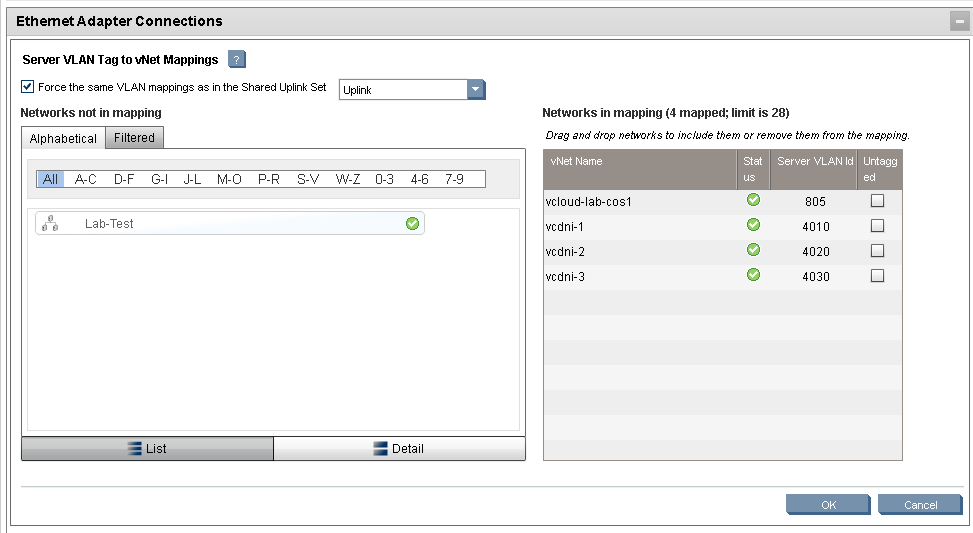
Building a new vCloud 1.5 just after vSphere 5 RTM’d, we saw an issue that our guest OS’s were not working.  We mapped in HP Virtual Connect Manager to multiple VLANs so that we could use vcdni with vCloud.  We could ping the guest VM’s on these VLANs, but we could not do anything else to them.
image
The issue appears to stem from an Emulex driver & firmware version.
http://kb.vmware.com/selfservice/microsites/search.do?language=en_US&cmd=displayKC&externalId=2007397
The Solution is that HP has updated their advisory with firmware fixes to get this working
Support Flex-10 or Flex Fabric Adapters on VMware ESXi 5.0 in a Virtual Connect Environment

Determine which ESXi Host has a .vmdk file locked

October 31, 2011 · 2 comments
I was trying to remove some dead files left over from failed P2V attempts on an ESXi 5.0 host.  The question I have is which host has the file locked, I don’t want to reboot more than is necessary.  I am using iSCSI targets, and this command gives you a list of which Mac address has a file locked

vmkfstools –D /vmfs/volumes/<UUID>/<VMDIR>/<LOCKEDFILE.xxx>

I was able to get output that had this in it:

Hostname vmkernel: 17:00:38:46.977 cpu1:1033)Lock [type 10c00001 offset 13058048 v 20, hb offset 3499520
Hostname vmkernel: gen 532, mode 1, owner 45feb537-9c52009b-e812- 00137266e200 mtime 1174669462]

Therefore the offending Mac address is :00:13:72:66:E2:00

I opened my vSphere client and found the offending nic in my  Configuration/Network Adapters by traversing each suspect host.

After rebooting that host, the file lock is gone.

Credit to this article from VMW http://kb.vmware.com/selfservice/microsites/search.do?language=en_US&cmd=displayKC&externalId=10051

Migrate VM from VMware Server 2 to vSphere ESXi 5

October 31, 2011

I tried to migrate an offline VM from Server 2 to ESX 5, in the process I kept getting what seemed to be a snapshot error on a VM without snapshots.  The VM would successfully migrate and then give this error on power up, or during the P2V Converter if I chose to remove snapshots.

“The parent virtual disk has been modified since the child was created.  The content ID of the parent virtual disk does not match the corresponding parent content ID in the child.”

I tried about 7 times unsuccessfully to migrate the VM, then a friend suggested I modify the defaults of the P2V and choose HW version 7 instead of HW version 8, and this time it succeeded.

Storage Path Selection Policy Choices

October 3, 2011 · 2 comments

First we must talk about ALUA, it stands for “Asymmetric Logical Unit Access”, which is a feature on some mid range storage devices, (such as a Clariion) that will allow it to emulate a higher end array running Active/Active Storage Processors.  Each SP still owns the LUNS, but with ALUA, an SP can process data for the other one via the backplane in the chassis.

Keep in mind:

VMware Defaults are MRU for Active/Passive & Fixed for Active/Active

MRU never falls back automatically

Always ignore my advice and follow storage vendor best practices

Great place to find recommendations of what to use on your SAN

I am assuming your not using a 3rd party PSP, SATP or MPP, such as EMC Powerpath/VE (those are generally the best option if available)


Active/Passive (think EMC CX3 without ALUA)

Fixed = Not a great choice but will work.  Fixed will cause you to micro manage the ESX hosts to ensure that all hosts are on the same path.  If a host has a path fail and causes it to fail over to the 'non-preferred' path this will cause trashing with the remaining hosts possibly leading to downtime.

MRU = Best practice and a good choice, this will allow the storage array to set all ESX hosts to the proper path and eliminate LUN trashing or trespassing of the LUNs; all hosts in the cluster should be set this way. 

RR = Do not use, will cause trashing, data corruption and other issues.

Emulated Active/Active Mid Range Storage with ALUA Enabled, such as CX4 Clariion

Fixed = Decent Choice if you’re a control freak or have FC I/O bottlenecks.

MRU = Best Practice, vSphere 4 is aware of ALUA, this will allow the storage array to set all ESX hosts to the proper path and eliminate LUN trashing or trespassing of the LUNs; all hosts in the cluster should be set this way. Just make sure to balance the I/O among your SP’s.

RR = Works, but can cause excessive use of the backplane

Real Active/Active Higher End Storage such as Symmetrix

Fixed = Probably your best option,  will require each host and LUN to be set to opposite paths; and will require micro-management of the storage infrastructure.

MRU = Works, but probably not your best option, does not load balance traffic, could force all traffic to one HBA

RR = Easiest option as long as the SAN is dedicated to the vCenter, if not, perhaps Fixed is your best option
Setting up Sysprep for vCloud

August 4, 2011


Before Cloud Director can perform guest customization on virtual machines with pre-vista Windows guest operating systems, you must create a Microsoft Sysprep deployment package on each Cloud cell in your installation.


Procedure
1 Copy the Sysprep binary files for each operating system to a convenient location on a Cloud Director server host, such as /root/sysprep
Each operating system requires its own folder, MAKE SURE you use lower case for each folder, i.e. win2000 not Win2000.

Windows 2000 SysprepBinariesDirectory /win2000
Windows 2003 (32-bit) SysprepBinariesDirectory /win2k3
Windows 2003 (64-bit) SysprepBinariesDirectory /win2k3_64
Windows XP (32-bit) SysprepBinariesDirectory /winxp
Windows XP (64-bit) SysprepBinariesDirectory /winxp_64
SysprepBinariesDirectory represents a location you choose to which to copy the binaries.

Guest OS Copy Destination
1) stop the vcd services,  service vmware-vcd stop

2 Run the /opt/vmware/vcloud director/deploymentPackageCreator/createSysprepPackage.sh
SysprepBinariesDirectory command.
For example, /opt/vmware/vcloud-director/deploymentPackageCreator/createSysprepPackage.sh
/root/sysprep
3 Use the service vmware-vcd restart command to restart the Cloud cell.

Installing Windows XP in the cloud (VMware vCloud Director)

August 4, 2011 · 1 comment

The first thing you’ll notice in the XP install is that it doesn’t see the default vCloud provided hard drive.  Normally in vSphere, you can mount the Floppy drive with the image on ESX.  In vCloud, assuming you don’t have vSphere console access, you’ll need to copy the file from one of your ESX hosts to your local hard drive, the upload it to the cloud.   You’ll need to use a program such as WinSCP and grab the file from the ESX(i) host /vmimages/floppies/vmscsi.flp.  Once inside of vCloud Directory, go into your Catalogs/Media tab and upload the floppy image.  Assuming you’ve already uploaded your XP ISO into vCloud, mount them both and install away.

Lab Manager API deployment issue

August 2, 2011

Spent the last few days troubleshooting an issue, initially, we thought it might be a fenced vs. unfenced configuration conflict, but when users try to deploy Lab Manager environments from the API tool we wrote in house, the following error was generated:

=========================================

Unable to deploy virtual machines in resource pool "LBM4".

  • DRS failed to find hosts to deploy the virtual machines on the resource pool "resgroup-32975".
    • DRS failed to find host for virtual machine "049104-DC". vCenter reported: This operation would violate a virtual machine affinity/anti-affinity rule.
      • Unable to find host for virtual machine "RuleViolation".
    • DRS failed to find host for virtual machine "049105-VCM". vCenter reported: This operation would violate a virtual machine affinity/anti-affinity rule.
      • Unable to find host for virtual machine "RuleViolation".
    • etc…..

=========================================

Since verything worked great from the Lab Manager UI, we knew it must be an API issue, it turns out the answer was that the old script from the Lab Manager 3 days was using the “Do Not Span Hosts” option.

Of course you want to span hosts in Lab Manager 4 !!